List Adapter
Converts an array of plain JSON objects to a format compatible with List widget and its qPort
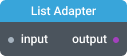
In-ports
input Array - an array of plain JSON objects.
Out-ports
output QData - data compatible with List widget.
Overview
List Adapter converts input data to the format compatible with List widget's q-data port. Specify keys for ID, Name and additional value fields (optional) in the Settings dialog.
Note: List Adapter can not perform aggregations on numeric properties. Resulting dataset for List widget will not contain enough data to render bars for list items.
Settings
ID field key
Key in the input dataset that will be used for list items ID.
Name field key
Key in the input dataset that will be used for list items Name.
Value fields
Click on "+" to add one or more additional value fields to the list dataset.
- Value field key - key of the Value field
- Header - column header for this value field
- Additive value - If enabled, numeric values will be summed for each ID group
- Value converter - converter for the numeric values. See Value Formatters to learn how to format values of different data types.