Stream Mux
Combines multiple named input streams into a single output stream. Use with Stream Demux to split the combined stream back into the individual original streams.
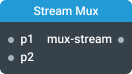
In-ports
p1 … pN <any> — input streams to be multiplexed.
config JSON (dynamic) — accepts a JSON object with configuration properties that can be set at runtime.
Out-ports
mux-stream Object — multiplexed events from input streams.
Overview
The Stream Mux component combines multiple named input streams into a single multiplexed output stream. Each emitted message includes the source name and value, allowing complementary Stream Demux component to split the combined stream back into the individual original streams and route all data events and signals accordingly. This component can connect to multiple Stream Demux components. A pair of Stream Mux and Stream Demux components guarantee that events and signals are not combined, maintain the order within each input stream, and not lost.
To use the Stream Mux component, configure the number of input streams in settings and name each input port with a unique identifier. Connect the output port to the input port of a Stream Demux component, then name its output ports to match.
A common use case for the Mux component is for management of large number of wires between various parts of the application. By combining several wires into a single multiplexed wire, you can pass data to another part of the application using one wire.
Settings
Number of input ports (portCount)
Specifies how many input ports the component will have. Default port names are p1, p2, p3, etc.
Type: Number
Required: Yes
Minimum: 1