Stream Demux
Splits a single multiplexed input stream into multiple named streams. Use with the Stream Mux component to combine multiple input streams into a single multiplexed stream.
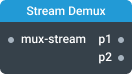
In-ports
mux-stream Object — multiplexed stream.
config JSON (dynamic) — accepts a JSON object with configuration properties that can be set at runtime.
Out-ports
p1 … pN <any> — demultiplexed output streams; the number of outputs is configured in setting.
Overview
The Stream Demux component splits a single multiplexed stream into individual source streams, routing all data events and signals based on stream name. Use it with the complementary Stream Mux component, which combines multiple input streams into a single multiplexed stream. This component can connect to multiple Stream Mux components. Together, these components ensure that events and signals maintain their order within each stream, remain separate, and are never lost.
To use the Stream Demux component, configure the number of output streams in settings and name each output port with an identifier that corresponds to source stream names. Connect the input port to the output port of a Stream Mux component.
A common use case for this component is managing a large number of wires between various parts of an application. By combining several wires into a single multiplexed wire, you can pass data to another part of the application using just one wire.
Settings
Number of output ports (portCount)
Specifies how many output ports the component will have. Default port names are p1, p2, p3, etc.
Type: Number
Required: Yes
Minimum: 1
Enable realtime config port
When enabled, this setting allows the component to be configured via the config port. The port accepts a configuration object as input, enabling dynamic property updates during runtime. While using this port won't trigger component reinitialization, it may result in the loss of some previous component state.
Strict mode (strictMode)
When enabled, strict mode ensures that each output port receives events from only one source Stream Mux component. If an event routed to a named output port comes from a different source than previous events on that port, an error will be triggered.
This is useful in complex data flow scenarios to ensure each output stream maintains a consistent data source.
Type: Boolean
Required: No Default: False
Configuration object
Here is an example of a configuration object that you can use as a template:
{
  "strictMode": true
}